Slider is playing
Curriculum & Academics
Teachers and students at Stoneville participate in state recognized curriculum and instruction. NCDPI Standard Course of Study
Stoneville utilizes the RCS Curriculum Guides with pacing as the guide for our planning, curriculum, and classroom lessons.
If you have questions regarding standards being taught please contact the following:
Your child's teacher
Your child's school:
Kasie Pruitt, Principal
Amber Haskin, Instructional Coach
AIG - Academically and Intellectually Gifted
In North Carolina, state legislation mandates that public schools identify and serve academically or intellectually gifted (AIG) K-12 students. Each LEA determines how to identify and serve its own AIG student population. This honors local context and supports each LEA to do what is best for its own AIG student population. LEAs must adhere to state legislation, which guides LEAs and defines academically or intellectually gifted students, and also use the NC AIG Program Standards, as a guide in the development of local AIG plans and programs.
Elementary Resources
RCS provides a number of resources to help navigate our elementary school programs. Click below to explore different links or visit even more resources on the RCS District Page.
SPLASH
Find out more about our SPLASH (Spanish Language Immersion Program) by following the link below.
Sora - eBook Library
Rockingham County Schools is pleased to offer our eBook program on Sora. Our digital collection contains over 5700 titles available for checkout. Please see your school's Media Coordinator for log in information.
Infinite Campus
Infinite Campus provides parents and guardians with access to important information about their student’s grades and attendance. By logging in through the Campus Parent mobile app or the Infinite Campus site, families can stay informed and engaged with their student’s academic progress throughout the school year. Regularly checking Infinite Campus helps parents and guardians track performance, monitor attendance, and support their student’s success.
Infinite Campus Parent Portal information access can be retrieved from the front office at the school. The individual seeking access must provide valid identification and must be listed as a legal guardian for the student in Infinite Campus.
Once you have access to the Campus Parent Portal, you will need to update your students information: How to Update Student Information in the Campus Parent Portal Instructions Link
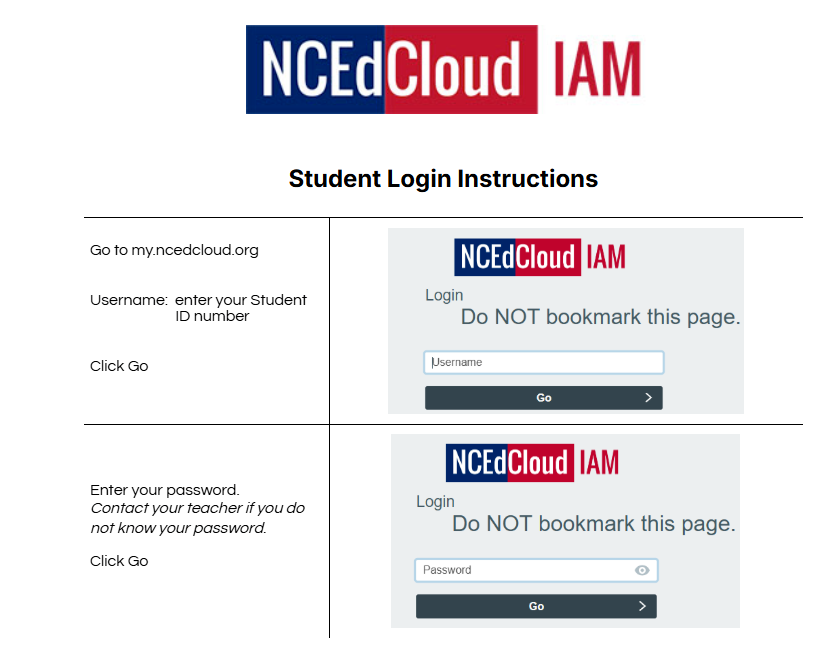
NCEdCloud